Tutorial and MCP tools deployed to production. Last updated on .
Vertov lets AI agents read screen recordings and record tutorials of web apps
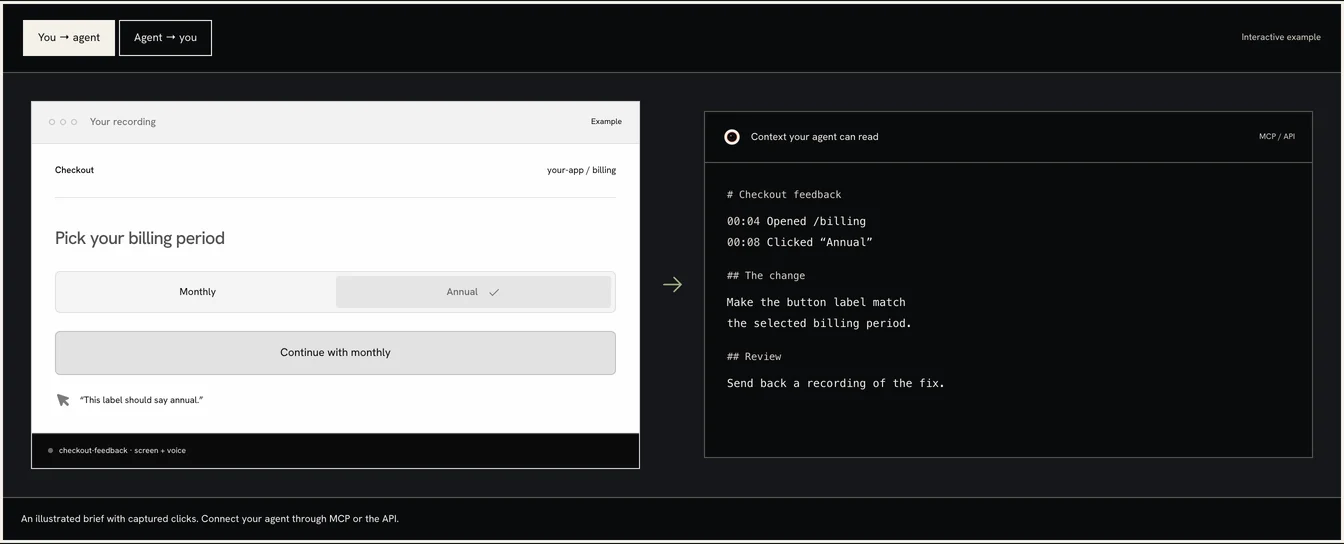
Vertov runs a remote MCP server at https://vertov.app/mcp. An MCP client signed in to a Vertov account can list the videos that account can see, read a recording as a timestamped transcript or Markdown brief, upload a video, comment on one and generate a document from it. Workspace owners and admins can also ask an agent to record a narrated how-to of their own web app in a hosted browser.
What an agent can do
The server uses Streamable HTTP and speaks to any MCP client. You sign in with OAuth and choose one workspace, and the agent then acts as you there. Scripts can use an API key instead. A full Vertov account is needed to sign in, and the Free plan is enough.
Agents can read the videos you can open: search titles and transcripts, fetch a video's summary, chapters and timestamped transcript, or fetch a Markdown brief of what was shown and said, including clicks captured by the Chrome extension. They can upload an MP4 or WebM, copy a video from a public https URL, add a comment at a timestamp, and write a document such as a bug report or SOP from a transcript. There are no tools that delete videos or change who can see them.
Agent-recorded tutorials of your own web app
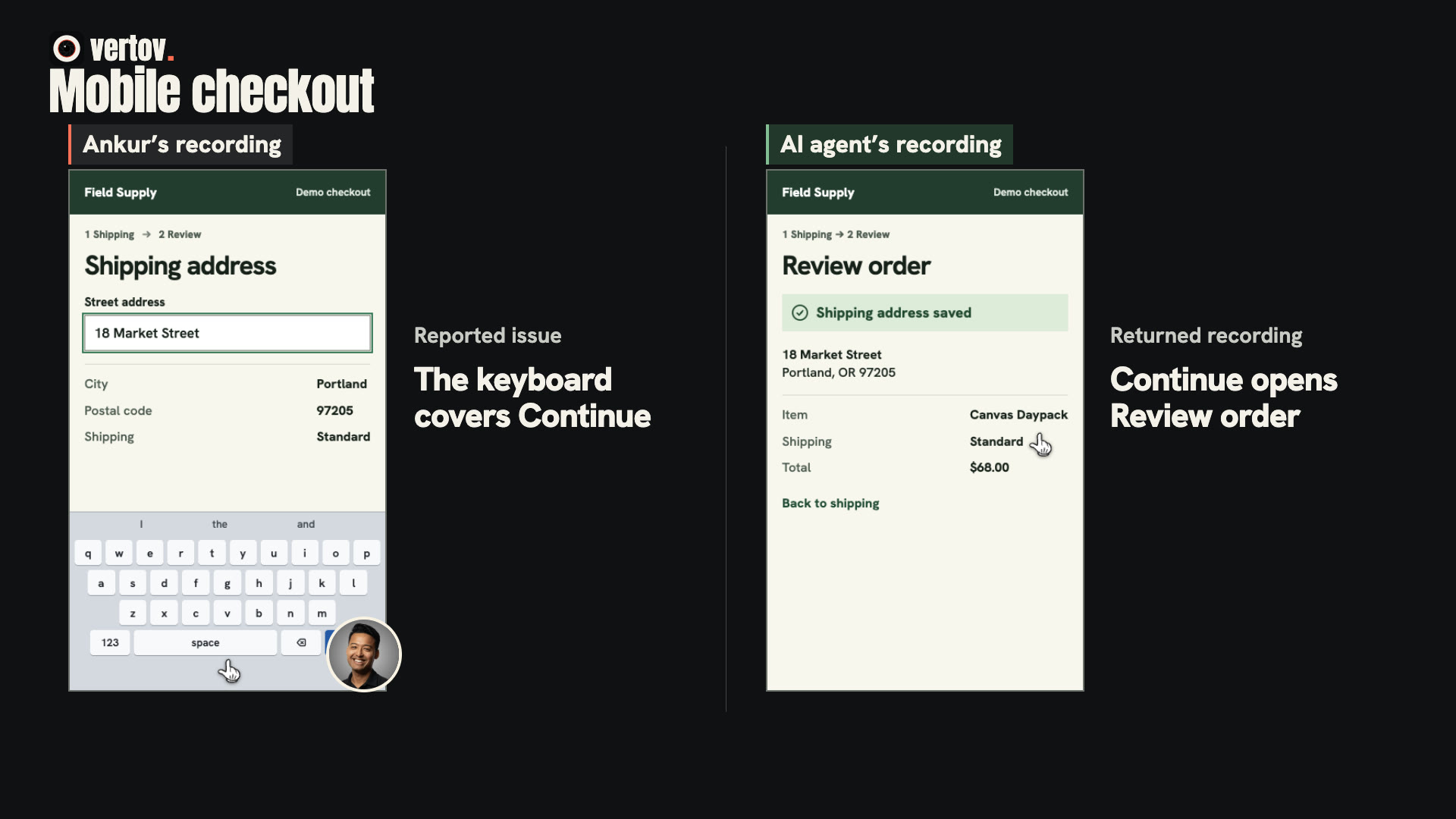
An owner or admin adds their web app under Settings, Agents, proves they control the domain, and supplies a demo login. The agent can then inspect a page, which returns a screenshot and the page's buttons, links and fields, write the steps of a how-to, and record them in a hosted browser with narration. The result is a normal Vertov video in the workspace. A recording can be repeated after the app changes.
Clicks and form submissions in a recorded tutorial can change data in the app, so Vertov asks for a demo account and says so in the tool descriptions. Monthly limits are 3 recordings on Free, 30 on Pro, 100 on Team and 300 on Business. In the Chrome extension, a person can also describe a how-to and watch an agent work through it in their own tab, review the steps and narration, and then record it.
What this is not
Vertov does not give an agent control of anyone's desktop, and it is built for people who hand work to coding agents. Agents read recordings that an account can already open, and the recording tools work in a browser tab or in a hosted browser pointed at an app whose owner verified it. The brief labels the transcript and captured events as recorded material, not as instructions from the account owner.
Where it stands
Setup instructions cover Claude, Claude Code, ChatGPT and Codex, and the server works in Claude and in ChatGPT. Vertov is not yet listed in the connector directories of Claude or ChatGPT, so it is added as a custom connector with its address. Vertov is listed in the Official MCP Registry and in the Cursor directory, and the directory listings link to both. The tutorial tools were deployed on November 3, 2026 and first verified end to end on production on November 4, 2026. The OAuth discovery and sign-in challenge passed on both the US and EU hosts on November 23, 2026; EU storage has its own announcement. The company announcement covers the rest of the product.
What is live
- Remote MCP server at https://vertov.app/mcp, with OAuth or an API key
- Read tools: list_videos, get_video, get_video_prompt, get_ai_doc, list_spaces
- Write tools: upload_video, create_video_from_url, add_comment, generate_ai_doc
- Tutorial tools for owners and admins: inspect_app_page, record_tutorial, rerecord_tutorial
- Monthly tutorial recording limits by plan: 3, 30, 100 and 300
Limits
- Agents read recordings the signed-in account can already open. There are no delete or visibility tools.
- Tutorials are recorded in a browser, not on a desktop, and only for an app whose domain the workspace verified.
- Not yet listed in the Claude or ChatGPT connector directories, so it is added as a custom connector with its address.
- Hosted-only. The MCP server is not part of the open-source edition.
Primary sources
Product and docs
About Vertov
Vertov is a screen recorder for people and AI agents. It records a browser tab, window, screen or camera, gives you a share link when you stop, and lets an AI agent read the recording as a transcript and brief. Plans are priced per workspace, not per seat. vertov.app
Media contact
For interviews, facts to check and partnership enquiries, write to press@vertov.app. For help using Vertov, write to support@vertov.app.
Related announcements
Vertov is a screen recorder for people and AI agents
Vertov records a tab, window, screen or camera, shares a link when you stop, and gives AI agents the recording as a transcript and brief. Plans are priced per workspace.
Vertov publishes its open-source core under AGPL-3.0
Vertov published a self-hostable edition on GitHub on November 21, 2026 under AGPL-3.0. Hosted-only features such as MCP and AI documents are not in it.